 GetMCP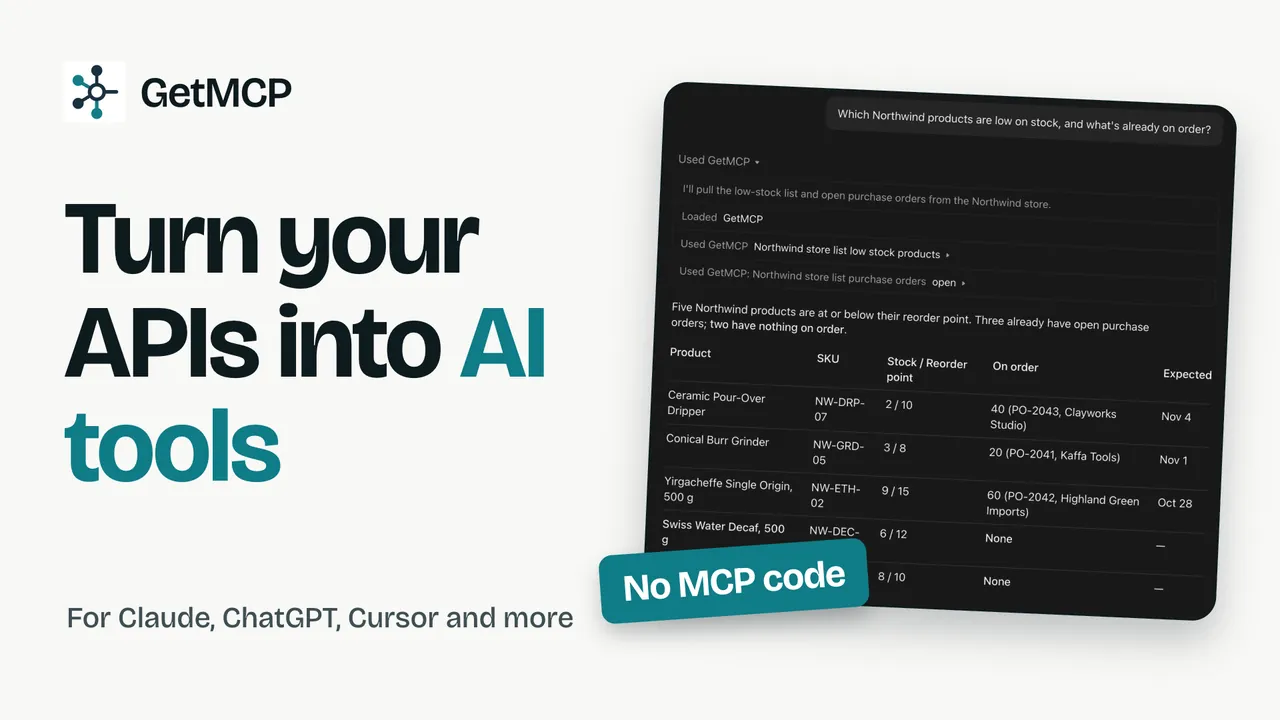
We hooked up our CRM in 5 minutes, now Claude can help maintain enrich assign tasks on autopilot. The hardest part is looking for more business SaaS to itegrate :) Thanks so much team, its really magic!!
Turn any API into an MCP server, without writing MCP code.
GetMCP is a self-hosted MCP server builder. Import an OpenAPI spec, a Postman collection or a single cURL request, and your tools show up in Claude, ChatGPT, Cursor and every other MCP client within minutes.
Runs on your own server as a standalone app or a WordPress plugin. The free plan needs no card.
request.sh
What you import
MCP tools GetMCP generates
+ 1 tool
Works with any MCP client, including
See supported clients Claude
 ChatGPT
 Cursor
 Claude Code
 VS Code
 Gemini
 Windsurf
 OpenClaw
 Zed
Zed
Watch an API become an MCP server
An eight-minute tour: a demo store's API turns into MCP tools, Claude answers a real stock question with them, and you see every screen you will use.
Jump to a part
- 0:00Your AI can't see your apps
- 0:20What MCP is, and the missing piece
- 1:01Turn an API into tools
- 2:32Shape what the AI sees
- 3:20Try it with a real model
- 3:55Connect Claude through the Gateway
- 5:02Templates and connectors
- 5:27Let your AI build it
- 5:43Safe by default
- 6:25Analytics and logs
- 7:00Share it with the Launch Kit
- 7:24Runs anywhere
- 7:47Plans
Nothing loads from YouTube until you press play. Watch on YouTube
From your API to a live MCP server in four steps
You map endpoints. GetMCP speaks the protocol, tracks the MCP specification and keeps your tools working when it changes.
-
Install
Put it on a subdomain like mcp.yourapp.com
One command on any PHP host. The installer checks the server, creates the database and your login. Already on WordPress? Install the plugin there instead.
curl -fsSL get.getmcp.com | bash
✓ checks  ✓ database  ✓ admin
-
Create a server
One server per product, tenant or environment
Give it a path and an auth strategy. Each server gets its own URL, tools, logs and rate limits, all from the same install.
server  production
path    /mcp/production
auth    OAuth 2.1
-
Import tools
Paste a cURL or upload the spec you already have
GetMCP reads the API definition and generates tools with schemas, descriptions and parameter validation. Edit any of them, or add more by hand.
import  openapi.json
+ 24 tools generated
+ 3 prompts, 2 resources
-
Share the URL
Your users connect from the AI client they already use
Ship one URL. They add it to Claude, ChatGPT, Cursor or VS Code, or use the one-click connect buttons, and your app is available in conversation.
// claude_desktop_config.json
"yourapp": {
  "url": "mcp.yourapp.com/mcp/production"
}
Want the detail? Read how a request moves through GetMCP.
A dashboard you host, not a service you rent
Everything lives on your server: the tools, the credentials, the logs. These are real screens from GetMCP 1.6.
Every MCP server you run, on one screen
Create as many servers as you need: one per product, per customer or per environment. Each has its own endpoint, auth strategy, tool list and call log, and you can clone one to promote it between environments.
- Unique URL and auth per server
- Status and health at a glance
- Export a server to a file and recreate it anywhere

Import a whole API, then edit any tool
Bring the API definition you already maintain: an OpenAPI 3.x document, a Swagger 2.0 file, a Postman collection or a single cURL request. Every imported tool is yours to rename, trim, redact or re-map; nothing is locked.
- Typed argument schemas generated for you
- JMESPath response pruning and PII redaction per tool
- Test any tool with real inputs before you expose it

Hand it to Claude or Cursor in one click
Every server has a Quick Connect panel. It checks the things that would stop a client from connecting, then opens Claude or installs into Cursor with the server filled in. Step-by-step instructions cover Claude Desktop, Claude Code, Windsurf, VS Code and the OpenAI playground.
Supported clients
Test with a real model before anyone else does
The chat playground drives your server the way Claude or ChatGPT will: a real provider, real tool calls, real auth. Watch the model pick a tool, see the request and the response inline, and fix a description before a customer ever hits it.
About the chat playground
One product. Install it wherever you already are.
The standalone app and the WordPress plugin are the same codebase: same admin, same tools, same MCP endpoints. Pick whichever fits the infrastructure you already run.
Most people start here
Standalone app
A self-contained PHP application. Upload it, open it in a browser, and the installer takes you through requirements, database and your administrator account.
- Any host with PHP 8.3 or newer: shared hosting, cPanel, a VPS or Docker
- SQLite needs no setup; MySQL and PostgreSQL are supported
- No WordPress, no Node, no build step
- One cron line and you are done
Already on WordPress?
WordPress plugin
The same product, installed into a site you already operate. WordPress handles install, updates, logins and cron, so there is nothing new to provision or back up.
- Installs like any plugin, lives in wp-admin
- Reads posts, pages and media as resources
- Ready templates for WordPress and WooCommerce
- Move a server between builds with one export file
Docker images and the Windows installer use the same build as the standalone app. Whichever you pick, your data never leaves your server.
Everything the protocol supports, nothing you have to build
GetMCP covers the full MCP surface, tools, prompts and resources, plus the operational pieces you would otherwise write yourself.
Tools
Callable functions backed by your API, with a full JSON Schema for arguments, typed responses and per-tool scopes.
Prompts
Parameterised templates that show up as slash commands in Claude, Cursor and Windsurf, bundling the right tools with the right framing.
Resources
Documents, records and live data exposed as URIs the model can read on demand, static or templated, with optional caching.
Four auth strategies
API key, bearer token, basic auth and OAuth 2.1 with automatic refresh. Credentials pass through to your API and are never stored by us.
Analytics and logs
Every call recorded with client, latency, status and payload size. Filter, replay from production and export as JSON or CSV.
Rate limits and retries
One per-client policy applied to every server, 429s surfaced cleanly, and exponential backoff on upstream errors so a flaky API does not break the agent.
MCP Gateway
One endpoint that publishes every server on your install, with its own OAuth, API key or bearer auth. Configure a client once. About the gateway
Manage with AI
GetMCP is an MCP server of its own. Connect Claude or Cursor, sign in once, and build or edit servers by asking. How it works
Redaction and response shaping
Strip email addresses, card numbers and other personal data before the model sees them, and prune responses with a JMESPath selector. All security controls
Connect the systems you already run, not just your API
Seventeen templates install a working server in a minute. Three of them are connectors: they talk to a database, a mailbox or a file server directly, with the write tools switched off until you decide otherwise.
Database
MySQL, MariaDB or PostgreSQL. Nine tools, read-only by default, with a row cap and a timeout on every query.
Mailbox
Gmail, Outlook or any IMAP account. Fifteen tools to read, search, file and reply, with sending off until you enable it.
WordPress and WooCommerce
Seventeen tools for a site and five for a store. Set the address once and every tool follows it.
Stripe, GitHub, Slack and more
Twelve API templates, each pre-wired to its service. Paste the credential it asks for and connect a client.

What teams expose first
Whether your product is a CRM, a helpdesk or an online store, the path is the same: map the API, ship the server, watch the calls arrive.
Project management
Customers create tasks, reassign work and pull sprint reports from their AI client.
list_projectscreate_taskassign_user
Customer support
Agents triage tickets, draft replies and close threads, grounded in your real ticket data.
search_ticketsreply_ticketescalate
Analytics and reporting
Expose queries and dashboards as tools. People ask in plain language and get real numbers back.
run_queryfetch_dashboardexport_csv
E-commerce
Shoppers browse the catalogue, place orders and track shipments inside their assistant.
search_productscreate_ordertrack_shipment
Developer tools
Deploy, roll back and tail logs. Give coding assistants first-class access to your build and runtime.
deployrollbacktail_logs
Internal operations
Wire up any internal API, from HR to finance, and give your team a private copilot on top of it.
privatesso_gatedaudit_logged
What people who run it say
Our internal CRM API had a Postman collection sitting unused for months. I imported it into GetMCP and had a working MCP server in under twenty minutes. Our Claude agent now reads and updates CRM records directly, with no custom backend code. That alone justified the price.
As an agency we manage several client APIs and needed to expose them to different AI tools without building a custom server for each one. GetMCP's multi-server dashboard handles exactly that, and pausing a server without deleting it saves real headaches during client handoffs.
It is now so easy to set up MCP! I’m using it across all my application stacks that have an API but no native MCP support. It has saved me a tremendous amount of time and energy compared with building integrations myself, while also helping streamline my entire...
Picked up GetMCP to connect our internal tools, and the initial setup was surprisingly fast. Probably saved me hours of configuration work. Looking forward to expanding our usage and future features.
Many LTD tool just provided API. For me , Reoon Email Verifier, Now i can connect it to google spark via GETMCP. that is so great for me to outreach the leads.
Self-hosted, licensed once a year, yours
A flat annual licence with no per-call fees and no usage gates. Run as many servers, tools and calls as your server can handle.
Most popular
Pro
$49per year
For teams shipping a real MCP server, on one site.
- Everything in Solo
- Unlimited servers and tools
- Unlimited calls, no metering
- OpenAPI, Swagger and Postman import
- OAuth 2.1 and per-client rate limits
- Priority email support
- 1 site
Agency
$149per year
For teams managing MCP servers across many client sites.
- Everything in Pro
- Up to 25 sites
- Partner support and onboarding
Unlimited
$499per year
For teams running GetMCP everywhere, with no site limit.
- Everything in Agency
- Unlimited sites
- One licence for every install you run
Solo
$0free forever
Get your first MCP server running on any host. No card needed.
- 1 MCP server
- Up to 10 tools
- 1,000 calls a month
- cURL import or manual tool creation
- API key, bearer and basic auth
- Community support
Every plan installs the same way and includes product updates. Compare every feature side by side.
Questions people ask before they install
Where does GetMCP run?
On your own server, wherever that is. The standalone app installs on any host with PHP 8.3 and a database: shared hosting, a VPS or Docker. You upload it, open it in a browser and answer three screens: requirements, database, administrator. SQLite needs no setup at all, and MySQL and PostgreSQL are both supported.
If you already run WordPress, there is a plugin build that installs the same product into a site you are already operating. Both builds share the same code: the same tools, resources, prompts, chat playground, OAuth, analytics and MCP endpoints.
Do I need to write any MCP code?
No. You map endpoints or upload a spec, and GetMCP generates compliant tool, prompt and resource definitions. When the MCP specification changes, a product update applies the new protocol and your tools keep working.
Which MCP clients work with it?
Any client that implements MCP over HTTP or SSE. That includes Claude Desktop, Claude Code, ChatGPT, VS Code, Cursor, Windsurf, Zed and a growing list of agent frameworks. Your users paste the server URL once.
How does authentication work?
Credentials pass straight through; GetMCP never stores them. You share the MCP server URL and the connection method with your users. They add the URL to their client and set their own credential, typically a bearer token, in the client configuration.
When the client calls the server, it sends those credentials along. GetMCP validates them and forwards them to your API, so the same user identity flows end to end and every permission boundary your API already enforces stays in place. OAuth 2.1 is available when you want a sign-in flow instead.
Can I write tools by hand?
Yes. The visual editor lets you define a tool with full JSON Schema, attach any HTTP request as the backend and add response transformations. Handy for endpoints you would rather not expose one to one.
Is my data hosted by you?
No. GetMCP runs entirely on your server. Traffic flows from the MCP client, through your server, to your API. We never see the calls or the data.
What about analytics and logging?
Every call is recorded with tool name, client, latency, status and payload size. Filter, replay or export the logs as JSON or CSV from the dashboard.
Is the WordPress version different from the standalone app?
No. It is the same application with the same admin interface. The only differences are the ones the host forces: the standalone app has its own installer, login and cron entry, while the plugin uses the ones WordPress already has. A server exports to a single file that recreates it on the other build.
Install in under a minute.
One command on any host with PHP 8.3, or drop the plugin into a WordPress site you already run. No Composer, no Node, nothing to build.
Then finish in the browser: database, administrator, done. Already run WordPress? Install it there instead.
# On any host with PHP 8.3 or newer
curl -fsSL https://get.getmcp.com | bash
# In PowerShell
irm https://get.getmcp.com/install.ps1 | iex
Make your app the one AI reaches for.
Install it on any PHP host, import your API and share one URL. Your users can call your tools from Claude tonight.